A Quick ITP/OCL Tutorial
What is it?
The ITP/OCL is a rewriting-based tool for inspecting, analysing, and checking UML+OCL static class diagram models. It relies on the equational specification of UML+OCL class diagrams summarized in [ClavelEgea06a].The ITP/OCL tool is part of a broader effort for integrating formal specification and verification into the industrial software engineering process.
What do I need to have?
The ITP/OCL tool is a Maude program. (Programs in Maude are typically built from
modules.) To run the ITP/OCL you need to have installed
the Maude system (version 2.1.1).
Maude runs on many Unix variants, including Linux.
You can download the Maude system (version 2.1.1) from the Maude's home page:
http://maude.cs.uiuc.edu.
The ITP/OCL tool is distributed as the gzip-tar-file
ocl-tool-vxxx.tar.gz
(where xxx is the version identifier).
You can download its latest version from the ITP/OCL tool's home page:
http://maude.sip.ucm.es/ocl.
To unzip-untar the file
ocl-tool-vxxx.tar.gz type at your shell's prompt
tar xvfz ocl-tool-vxxx.tar.gz
Your system will output
ocl-tool-vxxx/
ocl-tool-vxxx/ocl-basic.maude
ocl-tool-vxxx/ocl-tool.maude
The files ocl-tool.maude and ocl-basic.maude contain the
Maude modules that built the ITP/OCL tool's program.
What do I need to know?
The ITP/OCL tool relies on the equational
specification of UML+OCL class diagrams
summarized in
[ClavelEgea06a].
According to this specification, UML's class and object diagram models
can be expressed as (membership) equational theories,
so that OCL's expressions can be expressed as terms over
(well-defined extensions of) those theories.
However, to use the ITP/OCL tool you should only be familiar with the UML's notions of class and object models, and with the OCL's notation for writing constraints and queries over object models.
How do I get started?
The ITP/OCL tool is a Maude program. To run the tool
you need first to start the Maude interpreter.
Assuming that maude-path is the full-path to the directory
in which you have installed the Maude system,
to start the Maude interpreter type in at the shell's prompt
$>maude-path/maude.linux
		     \||||||||||||||||||/
		   --- Welcome to Maude ---
		     /||||||||||||||||||\
	    Maude 2.1.1 built: Jun 15 2004 12:55:31
	     Copyright 1997-2004 SRI International
		   Mon Oct 17 18:39:50 2005
The Maude system outputs its prompt:
Maude>Starting the tool
Assuming that itp-ocl-tool-path is the full-path to the directory in which you have stored the ITP/OCL tool's modules, to start the tool type in at the Maude's promptMaude> load itp-ocl-tool-path/ocl-tool.maude.Initialising a session To initialise an ITP/OCL session type in at the Maude's prompt
Maude> loop init-ocl .Loading a class diagram
Consider the following class diagram TRAIN-WAGON. It shows an example from a railway context: a train may own wagons, and wagons may be connected to other wagons (their predecessor and successor wagons). Also, trains can be identified by a string of characters and wagons can be either smoking or non-smoking.
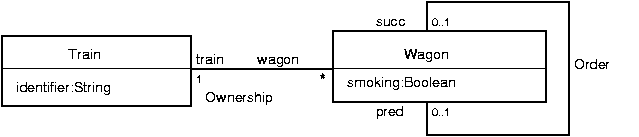
In what follows, we introduce the commands to be typed in at the Maude's prompt to load a class diagram in the ITP/OCL's database. We use the class diagram TRAIN-WAGON as our running example.
- Class diagrams
- To create a class diagram we use the command
create-class-diagramwith the class diagram's name. E.g.,
Maude> (create-class-diagram TRAIN-WAGON .)
- Classes
- To insert a class we use
the command
insert-classwith the class diagram's name followed by the class' name. E.g., for the class Train,
Maude> (insert-class TRAIN-WAGON : Train .)
Similarly, for the class Wagon,
Maude> (insert-class TRAIN-WAGON : Wagon .)
- Generalizations
- To insert a generalization between two classes we use
the command
insert-subclasswith the class diagram's name followed by the subclass' name and its superclass' name. E.g., we can add to our example a new class FirstClassWagon as a subclass of Wagon.
Maude> (insert-class TRAIN-WAGON : FirtClassWagon .)
Maude> (insert-subclass TRAIN-WAGON : FirtClassWagon -> Wagon .)
- Enumeration classes
- To insert an enumeration class we use
the command
insert-enum-classwith the class diagram's name followed by the enumeration class' name and its values (separated by a blank space). E.g., we can add to our example a new enumeration class TypesOfTrain whose values are Monorail and HighSpeed.
Maude> (insert-enum-class TRAIN-WAGON : TypesOfTrain - Monorail HighSpeed .) - Attributes
- To insert a class attribute we use
the command
insert-attrwith the class diagram's name followed by the class' name and the attribute with its type (between parenthesis and separated by a comma). E.g., for the attribute identifier,
Maude> (insert-attr TRAIN-WAGON : Train (identifier, String) .)
Similarly, for the attribute smoking,
Maude> (insert-attr TRAIN-WAGON : Wagon (smoking, Boolean) .)
If we add the the enumeration class TypesOfTrain to our example, we can also insert the attribute type in the class Train as follows:
Maude> (insert-attr TRAIN-WAGON : Train (type, TypesOfTrain) .)
- Associations
- To insert an association between two classes we use
the command
insert-assocwith the class diagram's name followed by the classes at each end of the association (separated by<->), along with their roles (separated from their classes by a semicolon) and multiplicities (separated from their roles by a semicolon). E.g., for the association Ownership,
Maude> (insert-assoc TRAIN-WAGON : Train : train : < 1 > <-> < * > : wagon : Wagon .)
Similarly, for the association Order,
Maude> (insert-assoc TRAIN-WAGON : Wagon : succ : < 0,1 > <-> < 0,1 > : pred : Wagon .)
Multiplicity values can be of two forms:-
<k>, with k either a natural number or the symbol*. -
<n,k>, with n a natural number and k either a natural number or the symbol*.
< 1 >are automatically added to the class diagram as invariants. -
- Association classes
- To insert an association class we use the command
insert-assoc-classwith the class diagram's name followed by the classes at each end of the association (separated by<->), along with their roles (separated from their classes by a semicolon), followed by the association class' name, along with its roles (at each side and separated by a semicolon). Examples of association classes are included in the Royal and Loyal model.
Loading an object diagram
Consider now the following object diagram TRAIN-WAGON-1. It shows an snapshot of the class diagram TRAIN-WAGON: a train, Train1, identified as HS7465SP, with two connected, non-smoking wagons, Wagon1 and Wagon2.
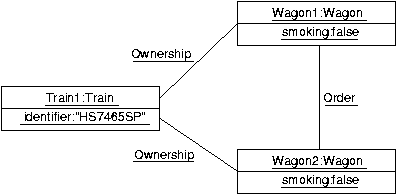
In what follows, we introduce the commands to be typed in at the Maude's prompt to load an object diagram in the ITP/OCL's database. We use the object diagram TRAIN-WAGON-1 as our running example.
- Object diagrams
- To create an object diagram we use the command
create-object-diagramwith the name of the class diagram of which the object diagram is a snapshot followed by the name of the object diagram itself.
Maude> (create-object-diagram TRAIN-WAGON : TRAIN-WAGON-1 .)
- Objects
- To insert an object we use the command
the command
insert-objectwith the object diagram's name followed by the name of the class of which the object is an instance and the name of the object itself. E.g., for the object Train1 of the class Train,
Maude> (insert-object TRAIN-WAGON-1 : Train : Train1 .)
Similarly, for the objects Wagon1 and Wagon2 of the class Wagon,
Maude> (insert-object TRAIN-WAGON-1 : Wagon : Wagon1 .)
Maude> (insert-object TRAIN-WAGON-1 : Wagon : Wagon2 .)
- Values
- To insert the value of an object's attribute we use the
command
insert-attr-valuewith the object diagram's name followed by the name of the class of which the object is an instance, followed by the name of the object, followed by the attribute with its type and value (separated by->). E.g., for the value of Train1's attribute identifier,
Maude> (insert-attr-value TRAIN-WAGON-1 : Train : Train1 : identifier : String -> "HS7456SP" .)
Similarly, for the values of Wagon1 and Wagon2' attribute smoking,
Maude> (insert-attr-value TRAIN-WAGON-1 : Wagon : Wagon1 : smoking : Boolean -> false .)
Maude> (insert-attr-value TRAIN-WAGON-1 : Wagon : Wagon2 : smoking : Boolean -> false .)
- Links
- To insert an association-link between two objects
we use the command
insert-linkwith the object diagram's name followed by the association, followed by the name of the objects to be linked (separated by<->). E.g., for the Order-link between the objects Wagon1 and Wagon2,
Maude> (insert-link TRAIN-WAGON-1 | Wagon : pred <-> succ : Wagon | Wagon1 <-> Wagon2 .)
Similarly, for the Ownership-links between the object Train1 and the objects Wagon1 and Wagon2,
Maude> (insert-link TRAIN-WAGON-1 | Train : train <-> wagon : Wagon | Train1 <-> Wagon1 .)
Maude> (insert-link TRAIN-WAGON-1 | Train : train <-> wagon : Wagon | Train1 <-> Wagon2 .)
To insert an association-class link between two object we use the command
insert-assoc-class-linkwith the object diagram's name followed by the association-class' association, followed by the association-class itself, followed by the name of the objects to be linked (separated by<->), followed by the object of the association-class that corresponds to the link.
Adding an invariant
Consider the following constraint over the class diagram TRAIN-WAGON: This constraint can be expressed using OCL as the following invariant of the class diagram TRAIN-WAGON:context Train inv atLeastOneWagon:
self.wagon->size() >= 1
Similarly, for the following additional constraints over the the class diagram TRAIN-WAGON:
- A wagon and its successor wagon should belong to the same train
context Wagon inv belongToTheSameTrain:
self.succ->notEmpty() implies self.succ->forAll(w | w.train = self.train) - All trains will have the same number of wagons
context Train inv sameNumberOfWagons:
Train.allInstances->forAll(t1 | (self.wagon->size() = t1.wagon->size())) - There do not exists two different wagons directly linked to each other in a cyclic way
context Wagon inv notInCyclicWay:
(Wagon.allInstances)->forAll(w2 |
self <> w2 implies not ((self.succ)->includes(w2) and (w2.succ)->includes(self))
- To use the contextualized variable self:
- use self along with its contextual class (separated by a semicolon).
- To apply a role or an attribute to an object:
- prefix the symbol
#to the role's name or the attribute's name; in addition, if the role's multiplicty is< 1 >, postfix the symbol@to the role's name; and - insert a blank space between the expression denoting the object and the role's name.
- prefix the symbol
- To apply a role to a collection of objects:
- use the collect iterator.
- To use an iterator-bounded variable
- use the variable along with its iterator-based class (separated by a semicolon).
- To apply an iterator with several iterator-bounded variables over a collection
of objects:
- apply the iterator in nested form.
- To apply the allInstances operator to a class:
- prefix the symbol
#to the operator; and - insert a blank space between the class' name and the operator.
- prefix the symbol
- Contextualized invariants
- To load a contextualized invariant
we use the command
insert-invariantwith the class diagram's name followed by the contextual class, followed by the contextualized invariant. E.g., for the invariant atLeastOnewagon,
Maude>(insert-invariant TRAIN-WAGON : Train : ((self:Train #wagon)->size() >= 1) .)
Similarly, for the invariant belongToTheSameTrain,
Maude>(insert-invariant TRAIN-WAGON : Wagon :
    ((self:Wagon #succ)->notEmpty() implies
        (self:Wagon #succ)->forAll(w:Wagon | (w:Wagon #train@ = self:Wagon #train@))) .)
Finally, for the invariant sameNumberOfWagons,
Maude>(insert-invariant TRAIN-WAGON : Train :
      (Train #allInstances)->forAll(t1:Train |

((self:Train <> t1:Train) implies (self:Train #wagon)->size() = (t1:Train #wagon)->size())) .)
- General invariants
- To load a general invariant
we use the command
insert-invariantwith the class diagram's name followed by the general invariant. E.g., for the invariant notInCyclicWay,
Maude>(insert-invariant TRAIN-WAGON ::

      (Wagon #allInstances)->forAll(w1:Wagon |

      (Wagon #allInstances)->forAll(w2:Wagon |

              w1:Wagon <> w2:Wagon

              implies not (((w1:Wagon #succ)->includes(w2:Wagon)

                      and (w2:Wagon #succ)->includes(w1:Wagon))))) .)
Parsing expressions
In what follows, we introduce the commands to be typed in at the Maude's prompt to check whether an OCL expression is well-typed.- Parsing
- To check if an expression is well-typed in the context of
a class diagram we use the command
parse-inwith the class diagram's name followed by the expression. E.g.,
Maude> (parse-in TRAIN-WAGON :: ((self:Train #wagon)->collect(w:Wagon | w:Wagon #smoking)) .)- To check if an expression is well-typed in the context of an object diagram we use the command
parse-inwith the class diagram's name followed by the object diagram's name and the expression. E.g.,
Maude> (parse-in TRAIN-WAGON : TRAIN-WAGON-1 :: ((Train1 #wagon)->collect(w:Wagon | w:Wagon #smoking)) .)
- To check if an expression is well-typed in the context of an object diagram we use the command
Evaluating queries
In what follows, we introduce the command to be typed in at the Maude's prompt to evaluate an OCL query over an object diagram.- Evaluating
- To evaluate a query over an object diagram we use the
command
query-inwith the class diagram's name followed by the object diagram's name and the query. E.g.,
 Maude>
(query-in TRAIN-WAGON : TRAIN-WAGON-1 : ((Train1 #wagon)->collect(w:Wagon | w:Wagon #smoking)) .)
Checking invariants
In what follows, we introduce the command to be typed in at the Maude's prompt to check that an object diagram in the ITP/OCL's database satisfies the invariants added to the class diagram of which the object diagram is a snapshot. We use the object diagram TRAIN-WAGON-1, as our running example (we assume that all the invariants discussed in the previous section has been added to the class diagram TRAIN-WAGON.)- Checking
- To check all the invariants over an object
diagram we use the command
check-invariantswith name of the class diagram of which the object diagram is a snapshot followed by the name of the object diagram itself. E.g., for the object diagram TRAIN-WAGON-1,
Maude>(check-invariants TRAIN-WAGON : TRAIN-WAGON-1 .)
For each invariant in the class diagram, the Maude system outputsokorfaileddepending on whether the object diagram satisfies or not the invariant.
Manuel Clavel and Marina Egea
24 April 2006