
SecureMOVA is an extension of the MOVA tool, a modeling and validation for UML diagrams with OCL constraints. The MOVA tool provides commands for building class and object diagrams, validating OCL constraints, and evaluating OCL queries. With the exception of its graphical interface, the MOVA tool is written in Maude, a rewriting-based programming language that implements a very rich equational logic. SecureMOVA extends the MOVA tool with commands for building SecureUML + ComponentUML diagrams and for evaluating OCL queries.
SecureUML provides a language for specifying access control policies
for actions on protected resources. However, it leaves open what the
protected resources are and which actions they offer to clients. These
depend on the primitives for constructing models in the system design
modeling language.
A SecureUML dialect specifies how the modeling primitives of SecureUML
are integrated with the primitives of the design modeling language in
a way that allows the direct annotation of model elements with access
control information.
The ComponentUML language is a simple
language for modeling component-based systems. Essentially, it
provides a subset of UML class models: Entities can be
related by Associations and have Attributes and/or
Methods.
The dialect definition then specifies the following:
| Resource | Actions |
|---|---|
| Entity | create, read, update, delete, full access |
| Attribute | read, update, full access |
| Method | execute |
| Association end | read, update, full access |
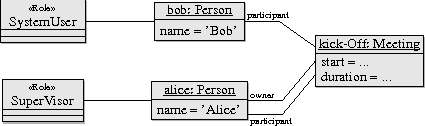
The following diagram models an example scenario of the above security policy. It contains two users, Bob and Alice with roles User and Scenario, respectively. It also contains one meeting, Kick-off, which has Alice as its owner.
> tar xvfz ocl-tool-vxxx.tar.gz
Your system will output
The Maude system outputs its prompt:
Assuming that $MOVA-PATH is the full-path to the directory
in which you have stored the MOVA tool's modules,
to start the tool type in at the Maude's prompt
The file
ocl-tool-v31/,
ocl-tool-v31/sec-ocl-basic.maude
ocl-tool-v31/sec-ocl-tool.maude
ocl-tool-v31/sec-ocl-invariant-representation.maude
ocl-tool-v31/sec-ocl-model-representation.maude
ocl-tool-v31/sec-ocl-spec-creation.maude
ocl-tool-v31/securemova.maude
Starting the tool
The (non-graphical) MOVA tool is a Maude program. To run the tool
you need to start the Maude interpreter.
Assuming that $MAUDE-PATH is the full-path to the directory
in which you have installed the Maude system,
to start first the Maude interpreter type in at the shell's prompt>$MAUDE-PATH/maude.linuxMaude>Maude> load $MOVA-PATH/sec-ocl-tool.maude
Initialising a session
To initialise a SecureMOVA session type in at the Maude's promptMaude> load $ITP-OCL-PATH/securemova.maudesecuremova.maude includes:
SEC+COMP-META corresponding to the metamodel
of SecureUML + ComponentUML.
Modeling a security policy along with an scenario
We list below all the commands that are used to build the security
policy SCHEDULER, along with the scenario
depicted above. The SecureMOVA commands should be
self-explanatory: each command consists of a keyword, that indicates
the action to be taken, along with some parameters that provide the
additional information that is needed to perform the given action.
For example, the command (create-security-diagram SCHEDULER .)
creates a blank security-design diagram SCHEDULER, while the
commands (insert-role SCHEDULER : Supervisor .),
(insert-permission SCHEDULER : SupervisorCancel .), and
(insert-permission-assignment SCHEDULER : SupervisorCancel :
Supervisor .) insert first the role Supervisor and the
permission SupervisorCancel in the diagram SCHEDULER,
and then assign the latter to the former in the same diagram.
(create-security-diagram SCHEDULER .)
(insert-role SCHEDULER : SystemAdministrator .)
(insert-role SCHEDULER : Supervisor .)
(insert-role SCHEDULER : SystemUser .)
(insert-role-hierarchy SCHEDULER | Supervisor <-> SystemUser .)
(insert-entity SCHEDULER : Meeting .)
(insert-entity SCHEDULER : Person .)
(insert-attribute SCHEDULER : Meeting : start : Integer .)
(insert-attribute SCHEDULER : Meeting : duration : Integer .)
(insert-attribute SCHEDULER : Person : name : String .)
(insert-association SCHEDULER : Meeting : meeting : < * > <-> < 1 > : owner : Person .)
(insert-non-query-method SCHEDULER : Meeting : cancel .)
(insert-non-query-method SCHEDULER : Meeting : notify .)
(insert-permission SCHEDULER : OwnerMeeting .)
(insert-permission SCHEDULER : UserMeeting .)
(insert-permission SCHEDULER : SupervisorCancel .)
(insert-permission SCHEDULER : UserManagement .)
(insert-permission SCHEDULER : ReadMeeting .)
(insert-permission-assignment SCHEDULER : OwnerMeeting : SystemUser .)
(insert-permission-assignment SCHEDULER : UserMeeting : SystemUser .)
(insert-permission-assignment SCHEDULER : SupervisorCancel : Supervisor .)
(insert-permission-assignment SCHEDULER : UserManagement : Supervisor .)
(insert-permission-assignment SCHEDULER : ReadMeeting : SystemAdministrator .)
(insert-entity-update SCHEDULER : OwnerMeeting : Meeting .)
(insert-entity-read SCHEDULER : UserMeeting : Meeting .)
(insert-atomic-delete SCHEDULER : OwnerMeeting : Meeting .)
(insert-atomic-create SCHEDULER : UserMeeting : Meeting .)
(insert-atomic-execute SCHEDULER : SupervisorCancel : Meeting : cancel .)
(insert-atomic-execute SCHEDULER : SupervisorCancel : Meeting : notify .)
(insert-entity-full-access SCHEDULER : UserManagement : Person .)
(insert-entity-read SCHEDULER : ReadMeeting : Meeting .)
(insert-authorization-constraint SCHEDULER : Auth1 : "equal[name[owner@[self:Class]], name[caller:Class]]" .)
(insert-authorization-constraint SCHEDULER : Auth2 : "true.Bool?" .)
(insert-authorization-constraint-assignment SCHEDULER : OwnerMeeting : Auth1 .)
(insert-authorization-constraint-assignment SCHEDULER : UserMeeting : Auth2 .)
(insert-authorization-constraint-assignment SCHEDULER : SupervisorCancel : Auth2 .)
(insert-authorization-constraint-assignment SCHEDULER : UserManagement : Auth2 .)
(insert-authorization-constraint-assignment SCHEDULER : ReadMeeting : Auth2 .)
(insert-entity-user SCHEDULER : Person .)
(insert-entity-instance SCHEDULER : Person : Alice .)
(insert-entity-instance SCHEDULER : Person : Bob .)
(insert-entity-instance SCHEDULER : Person : Charlie .)
(insert-entity-instance SCHEDULER : Meeting : Kick-Off .)
(insert-user-assignment SCHEDULER | Alice <-> Supervisor .)
(insert-user-assignment SCHEDULER | Bob <-> SystemUser .)
(insert-attr-value SCHEDULER : Person : Alice : name : String -> "Alice" .)
(insert-attr-value SCHEDULER : Person : Alice : name : String -> "Bob" .)
(insert-link SCHEDULER | Meeting : meeting <-> owner : Person | Kick-Off <-> Alice .)
Querying the security model
To query a security model built using the SecureMOVA commands, use the command
query-in with the OCL expression formalizing the query. You can use the operations
declared in the securemova.maude file, but you can also introduce your own operations
using the appropriate MOVA commands. Notice, however, that there are a few
syntactical differences with the standard OCL notation:
self, write self
along with its contextual class (separated by a semicolon).
# to the role's name or the attribute's name; in
addition, if the role's multiplicity is <1>, postfix the symbol @ to the role's name; and
collect iterator.
allInstances operator to a class (and, similarly,
for the oclIsTypeOf, oclAsType, and oclType operators):
# to the operator; and
# to the operator; and
SCHEDULER, along
with the scenario depicted above.
The queries use the OCL operations defined in the securemova.maude file.
(query-in SEC+COMP-META : SCHEDULER : (Supervisor #haspermission) .)
(query-in SEC+COMP-META : SCHEDULER : (OwnerMeeting #accesses) .)
(query-in SEC+COMP-META : SCHEDULER : (Supervisor #superrolePlus) .)
(query-in SEC+COMP-META : SCHEDULER : (Supervisor #allPermissions) .)
(query-in SEC+COMP-META : SCHEDULER : (MeetingEntityUpdate #subactionPlus) .)
(query-in SEC+COMP-META : SCHEDULER : (OwnerMeeting #allActions) .)
(query-in SEC+COMP-META : SCHEDULER : (Bob #allAllowedActions) .)
(query-in SEC+COMP-META : SCHEDULER : (SystemAdministrator #allAtomics) .)
(query-in SEC+COMP-META : SCHEDULER : (MeetingAtomicDelete #allAssignedRoles) .)
(query-in SEC+COMP-META : SCHEDULER : (Supervisor #allAuthConstRole(MeetingcancelAtomicExecute)) .)
(query-in SEC+COMP-META : SCHEDULER : (duplicateRoles) .)
(query-in SEC+COMP-META : SCHEDULER : (MeetingstartAtomicRead #minimumRole) .)
(query-in SEC+COMP-META : SCHEDULER : (OwnerMeeting #overlapsWith(SupervisorCancel)) .)
(query-in SEC+COMP-META : SCHEDULER : (existOverlapping) .)
(query-in SEC+COMP-META : SCHEDULER : (accessAll) .)
(query-in SEC+COMP-META : SCHEDULER : (Alice #isAllowed(Kick-OffAtomicDelete)) .)
(query-in SEC+COMP-META : SCHEDULER : (Bob #allAllowedActionInstances) .)
(query-in SEC+COMP-META : SCHEDULER : (Kick-OffAtomicDelete #allUsers) .)